
Updated 21 October 2026. Patched PHP versions are now available.
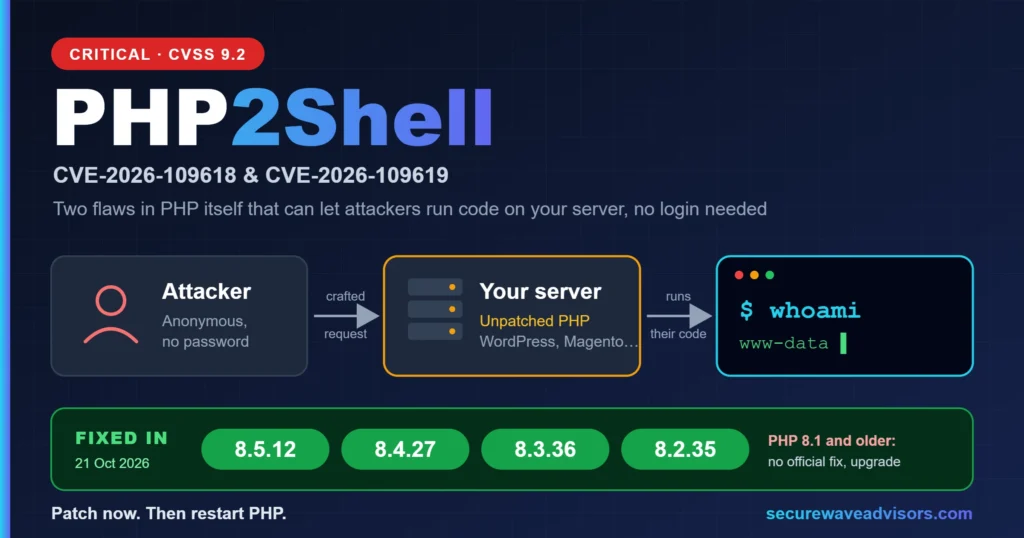
The short answer: The PHP2Shell patch is out. Two critical PHP flaws, nicknamed PHP2Shell, can let an attacker run code on a web server without logging in. PHP released fixes on 21 October 2026. Update to PHP 8.5.12, 8.4.27, 8.3.36 or 8.2.35 (or your hosting provider’s patched equivalent) today, then restart PHP. If you run PHP 8.1 or older, the PHP project is not releasing a fix, so you need a vendor backport or an upgrade.
What is PHP2Shell?
PHP2Shell is the nickname for two critical vulnerabilities in PHP itself, tracked as CVE-2026-109618 and CVE-2026-109619. The PHP security team rates both 9.2 on CVSS v4.0 (critical). Both can allow unauthenticated remote code execution (RCE): an attacker sends crafted web requests and runs their own code on your server, with no password and no login.
In plain English:
- CVE-2026-109618 (OOM corruption): if PHP runs out of memory while handling a request, internal data can be left half-built, and PHP’s cleanup may then treat it as valid. The UK NCSC describes it as RCE via RFC 1867 (file upload style) input parsing.
- CVE-2026-109619 (stale global state): internal state from one request can survive after its memory was freed, and a later request handled by the same worker may use it.
The details leaked before the planned disclosure date. Cloudflare said it was seeing early attacks, and code claiming to exploit the flaws was circulating online (unverified). Treat this as urgent.
Not the same as wp2shell. wp2shell (July 2026) was a flaw in WordPress core, fixed by updating WordPress. PHP2Shell is in PHP, the language WordPress runs on, so it is fixed at the server level. A WordPress site can need both updates.
Who is affected?
- Every PHP installation that serves web requests, including PHP-FPM, Apache with mod_php, php-cgi, FrankenPHP and LiteSpeed. PHP says the risk is highest for mod_php, where a demonstrated exploit triggers before any application code runs.
- The NCSC says organisations using PHP 5 onwards are affected.
- That means WordPress, WooCommerce, Magento, Drupal, Joomla, Laravel and custom PHP apps. PHP is used by roughly 69% of websites whose server-side language is known (W3Techs).
- Software that bundles PHP (control panels, appliances) can be affected too. NCSC-NL published a list of products with a PHP dependency.
Fixed PHP versions
PHP branch | Fixed version |
|---|---|
PHP 8.5 | 8.5.12 |
PHP 8.4 | 8.4.27 |
PHP 8.3 | 8.3.36 |
PHP 8.2 | 8.2.35 (security support ends 31 Dec 2026) |
PHP 8.1 and older | No update from the PHP project. Use a vendor backport or upgrade. |
For PHP 7.4, 8.0 and 8.1, the PHP security team published minimal source backports for people who build PHP themselves or have no vendor that patches for them. A distribution backport fixes this bug, but an unsupported PHP will not get fixes for the next one, so plan a move to PHP 8.4 or 8.5.
How to patch PHP2Shell
Step 1: Find out which PHP you run
- Not sure? Ask your hosting provider. In WordPress, go to Tools > Site Health > Info > Server to see the PHP version.
- Server access? Run
php -v. The command line version can differ from the one your web server uses, so also checkphp-fpm -vor the Apache module.
Step 2: Install the fix for your setup
Shared hosting, cPanel or managed WordPress hosting. You usually cannot patch PHP yourself. Contact your host and ask them to confirm the patched build is installed for your PHP version. Panels such as cPanel’s MultiPHP Manager or Select PHP Version let you switch versions, but that only helps once the host has installed the patched build. If you are on PHP 8.1 or older, move to 8.4 or 8.5. Back up first and test your plugins and theme.
Your own server, Ubuntu or Debian. Upgrade only the PHP packages (replace 8.3 with your version):
sudo apt-get update
sudo apt-get install --only-upgrade 'php8.3*' libapache2-mod-php8.3
Your own server, RHEL, AlmaLinux or Rocky Linux:
sudo dnf upgrade 'php*'Important: PHP says the volunteer-run Remi repository will not have updates today. Switch to your distribution’s packages or build from source.
Docker. Pull the new PHP image, rebuild your own images with docker build --pull, and recreate the containers.
Step 3: Restart everything that runs PHP
A running process keeps the old PHP in memory until it restarts.
How PHP runs | What to do |
|---|---|
PHP-FPM | Restart the service, for example |
Apache with mod_php | Do a full restart ( |
LiteSpeed / OpenLiteSpeed | Upgrade the lsphp packages, then run |
Queue workers, Supervisor jobs | Restart them |
Step 4: Verify
- Check the package version. On Ubuntu, fixes are often backported into the old version number (8.3.6 stays 8.3.6), so check the changelog instead of
php -v:zgrep -E 'CVE-2026-10961[89]' /usr/share/doc/php8.3-fpm/changelog.Debian.gz - On Debian and Ubuntu,
sudo needrestart -b -r llists services still running old code.
Can’t patch yet? Temporary measures
PHP is clear that updating is the only safe choice. These reduce exposure to specific attack paths but do not make a server safe:
- Set
memory_limit=-1in a way applications cannot override (for examplephp_admin_valuein the FPM pool or Apache config). - Set a low
post_max_size: 8M if your apps need no file uploads, 32M if they do. Keepupload_max_filesizebelow it. - Set
session.upload_progress.enabled=0in php.ini or the pool config (not viaini_set()), and restart every worker. - On PHP 8.5, set
fatal_error_backtraces=0. - A web application firewall such as Cloudflare’s managed rules can help as a stopgap, nothing more.
If you cannot patch or apply these quickly, the NCSC advises considering taking the system offline until it is mitigated.
Check whether you were already hit
Patching closes the hole, but it does not remove a backdoor planted earlier. Because exploitation was reported early, review the period since 20 October:
- Web server or PHP processes starting shells (sh, bash, cmd.exe, powershell) or download tools such as curl and wget.
- New or recently changed PHP files in uploads folders, plugin and theme folders, or the web root.
- Unknown admin accounts, cron jobs or scheduled tasks.
- Unusual PHP fatal or out-of-memory errors in your logs.
If you find anything, isolate the server, keep the logs, rotate credentials and get incident response help. The NCSC recommends specialist help if you are not confident doing this yourself.
After patching: harden
- Keep
session.upload_progress.enabled=0unless your app really uses PHP’s upload progress feature. - Set
session.use_strict_mode=1, which PHP recommends for every site. - Inventory every PHP runtime you own, including ones bundled inside other products.
- Retire PHP 8.1 and older, and plan your move off 8.2 before it loses security support on 31 December 2026.
- Subscribe to vendor and hosting security notices so the next patch is a routine update.
Check your server with our free script
We built a free, read-only shell script, php2shell-check.sh, that automates most of the checks above. Run it directly on your server over SSH and it will: report the PHP version for every PHP binary and PHP-FPM pool it finds and flag anything unpatched; catch processes still running an old PHP binary after an upgrade you forgot to restart; scan your web root for .php files modified since 20 October 2026, PHP files sitting inside upload folders, and common web-shell patterns such as eval(base64_decode(...)); and check your process list and logs for your web server user spawning a shell, curl, or wget.
It makes no network requests and does not attempt to exploit anything, so it is safe to run on a production server. Every result is a flag to review by hand, not a confirmation of compromise. Contact us for the download link, or to have our team run the check and the patch for you.
How Secure Wave Advisors can help
Not sure which PHP your sites run, or whether your host has patched? Secure Wave Advisors helps small and mid-sized businesses find their PHP exposure, verify patches, and check for signs of compromise. Contact us for a PHP2Shell exposure review, or see our Application Security Architecture Review service for an in-depth assessment.
Frequently asked questions
A nickname for two critical PHP vulnerabilities, CVE-2026-109618 and CVE-2026-109619, that can allow unauthenticated remote code execution on servers running PHP.
PHP 8.5.12, 8.4.27, 8.3.36 and 8.2.35. PHP 8.1 and older get no update from the PHP project.
If it runs on a server with an unpatched PHP, yes. Updating WordPress does not fix it. The PHP on the server must be updated, usually by your host.
Ask your host to confirm the patched PHP build is installed and your account runs on it. Then check your site for unexpected changes.
No. It blocks only the confirmed paths for CVE-2026-109619. PHP says the only complete fix is updating.
Cloudflare reported early attacks before the patch, and exploit code was circulating online. Assume active exploitation and patch now.
Look for web server processes spawning shells, new PHP files in uploads or the web root, unknown admin users and odd PHP errors since 20 October. If unsure, get incident response help.

About the author
Muhammad Ather, Founder and Principal Security Consultant at Secure Wave Advisors. 13+ years in security auditing, risk management and VAPT across banking, fintech and defence. CISSP, CEH, ECSA, CHFI.